Consumed vs burned
Both sides of the equation, plus the net figure.
Calories
Consumed against burned, and the net figure. Built from your meals, workouts and steps rather than typed in a second time, with thirty days of both lines on one chart.
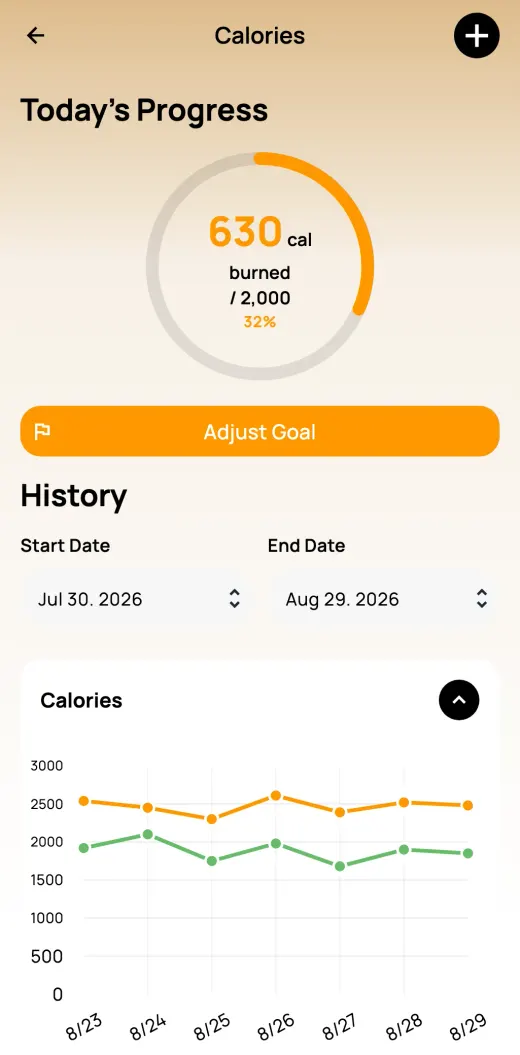
The Calories tracker does the arithmetic for you. Calories consumed come from what you log in Meals & Bevs; calories burned come from your workouts and steps.
You see the net figure for the day, and thirty days of both lines on one chart, so the trend is obvious at a glance.
Both sides of the equation, plus the net figure.
Built from your meals, workouts and steps rather than entered again.
Thirty days of consumed and burned on one chart.
Photograph, scan or search what you eat in Meals & Bevs.
Workouts and synced steps add to calories burned.
See the day’s net figure and the thirty-day trend.
No. Calories are built from your meals, workouts and steps rather than typed in a second time.
From your steps and from workouts, where calories come from MET values rather than a flat guess.
Yes. This tracker is one of fifteen that generate an Excel report over any date range you pick, which you can save or send anywhere through your phone’s share sheet, handy before a doctor’s appointment.
Track anything in your life, in one app, and ask AI what it means.