Three ways to log
Photograph the plate, scan a barcode, or search the food database, whichever is fastest for the meal in front of you.
Meals & Bevs
Photograph a plate and AI names each food and its portion, scan a barcode, or search the food database, and correct it in a sentence if it reads the plate wrong.
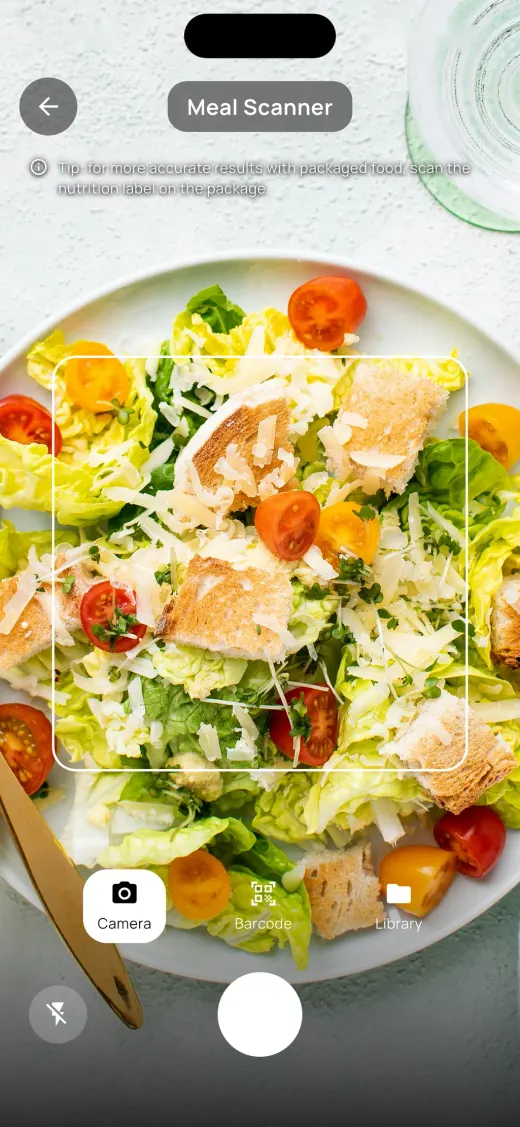
Meals & Bevs is the food diary inside KeeperPal. Every meal, snack and drink becomes a log with nineteen nutrients, from calories and macros down to iron and vitamin D, so what you eat can sit beside everything else you track.
The AI names what is on the plate, and the nutrition comes from matching those names against the food database rather than the AI inventing numbers. Nothing is saved until you say so: a scan lands on a review screen, not straight in your log.
Photograph the plate, scan a barcode, or search the food database, whichever is fastest for the meal in front of you.
Calories and macros, down to iron and vitamin D, recorded for every meal and drink.
Tell it “that’s chicken thigh, not breast, and there are two of them” and it runs the numbers again with your correction.
Save the foods you eat often and full recipes, so the next log takes seconds.
What you eat flows into Calories, consumed against burned, without typing it in a second time.
Meals is one of the trackers that shows a streak, climbing from Bronze to Platinum as you log on consecutive days.
Take a photo of the plate, scan the barcode on a package, or search the database.
Check each food and portion on the review screen, fix anything in a sentence, remove anything it invented, or set the serving size yourself.
The day’s nutrients and calories update, and the log is ready to chart against sleep, workouts or anything else.
You photograph the plate and the AI names each food and estimates its portion. The nutrition comes from matching those foods against the food database, and the result lands on a review screen so you can correct it before it is saved.
Tell it what it got wrong in a sentence and it recalculates with your correction. You can also delete anything it added, search the food database for what it missed, and set the serving size yourself.
Yes. Scan a barcode on packaged food, or search the food database, if you would rather not use a photo.
Downloading is free, and everyday logging in the built-in trackers stays free. Premium, monthly or yearly with 14 days free on the yearly plan, adds the AI, meal scanning from a photo, live workout and sleep sessions, and the trackers you create yourself.
Yes. This tracker is one of fifteen that generate an Excel report over any date range you pick, which you can save or send anywhere through your phone’s share sheet, handy before a doctor’s appointment.
Track anything in your life, in one app, and ask AI what it means.